Friday, 2 August 2013

AUGUST 2


Example programs for basic operations in SAP.

Example-1:
Assigning values to ABAP variables

Report 01
DATA: a TYPE i,
      b TYPE i,
      c TYPE i,
      d TYPE i.

a = 10.
b = a.
MOVE 20 TO c.
MOVE c TO d.

WRITE:/ a, b, c, d.

Output:
Example-2:
Basic Arithmetic Operations

Report 02
DATA: a TYPE i,
      b TYPE i,
      c TYPE i,
      d TYPE i.

*Using Mathematical Expressions
a = 10 + 20.
b = 20 - 10.
c = 10 * 2.
d = 100 / 2.

WRITE:/ 'Using Expressions'.
WRITE:/ a, b, c, d.

*Using Keywords
add 10 to a.
subtract 5 from b.
multiply c by 2.
divide d by 2.

WRITE:/ 'Using Keywords'.
WRITE:/ a, b, c, d.

Output:

Eample-3:
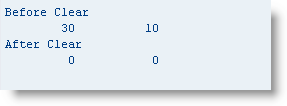
Clear ABAP variables

keyword CLEAR is used to set the variables to default values.

Report 03
DATA: a TYPE i,
      b TYPE i.

a = 10 + 20.
b = 20 - 10.

WRITE:/ 'Before Clear'.
WRITE:/ a, b.

clear: a, b.

WRITE:/ 'After Clear'.
WRITE:/ a, b.

Output:


Thursday, 1 August 2013

AUGUST 1


Studied the use of while, continue and check statements with example programs.

Using the while Statement

The while statement is a looping mechanism similar to do.

Syntax for the while Statement

The following is the syntax for the while statement.
while exp [ vary f1 from s-c1 next s-c2 [ vary f2 from s2-c1 next s2-c2 ... ]
    ---
    [ exit. ]
    ---
    endwhile.
where:
  • exp is a logical expression.
  • s is a field string having the components c1 and c2.
  • f1 is a variable. The components of s must be able to be converted to the data type and length of f1.
  • ... represents any number of complete vary clauses.
  • --- represents any number of lines of code.
Example:
An Example of the Use of the WHILE Statement
1  report ztx1012.
2  data: l,                         "leading  characters
3        t,                         "trailing characters
4        done.                      "done flag
5  parameters p(25) default '    Vendor Number'.
6  while done = ' '                 "the expression is evaluated first
7      vary l from p+0  next p+1    "then vary assignments are performed
8      vary t from p+24 next p+23.
9      if l = ' ' and t = ' '.
10         l = t = '-'.
11     else.
12         done = 'X'.
13         endif.
14     endwhile.
15 write: / p.
Output:  ----Vendor Number ----
Description:
  • Lines 2 and 3 define two single character variables l and t. Line 3 defines a flag to indicate when processing is complete.
  • Line 5 defines p as character 25 with a default value.
  • On line 6, the expression on the while statement is first evaluated. It proves true the first time through the loop. The assignments on lines 7 and 8 are then performed. Line 7 assigns the first character from p to l and line 8 assigns the last character to t.
  • If l and t are both blank, line 10 assigns a dash to both. If they are not, line 12 assigns an 'X' to the done flag.
  • On line 14, endwhile copies the values from l and t back to p.
  • The while loop repeats again from line 6 as long as the done flag is blank.

Using the continue statement

The continue statement is coded within a loop. It acts like a goto, passing control immediately to the terminating statement of the loop and beginning a new loop pass. In effect, it causes the statements below it within the loop to be ignored and a new loop pass to begin. 

Syntax for the continue Statement

The following is the syntax for the continue statement.
[do/while/select/loop]
    ---
    continue.
    ---
    [enddo/endwhile/endselect/endloop]
where:
  • --- represents any number of lines of code.
The following points apply:
  • continue can only be coded within a loop.
  • continue has no additions.
Example:
An Example of the Use of the CONTINUE Statement
1  report ztx1013.
2  parameters p(20) default 'c::\\\xxx\\yyy'.
3  data: c,                    "current character
4        n.                    "next    character
5
6  do 19 times varying c from p+0 next p+1
7              varying n from p+1 next p+2.
8      if c na ':\'.
9          continue.
10         endif.
11     if c = n.
12         write: / 'duplicate', c, 'found', 'at position', sy-index.
13         endif.
14     enddo.
Output:
duplicate : found at position          2
duplicate \ found at position          4
duplicate \ found at position          5
duplicate \ found at position         10

Using the check statement

The check statement is coded within a loop. It can act very much like continue, passing control immediately to the terminating statement of the loop and bypassing the statements between. Unlike continue, it accepts a logical expression. If the expression is true, it does nothing. If it is false, it jumps to the end of the loop. 

Syntax for the check Statement

[do/while/select/loop]
    ---
    check exp.
    ---
    [enddo/endwhile/endselect/endloop]
where:
  • exp is a logical expression.
  • --- represents any number of lines of code.
Example:
 Use of the CHECK Statement
1  report ztx1014.
2  parameters p(20) default 'c::\\\xxx\\yyy'.
3  data: c,                    "current character
4        n.                    "next    character
5
6  do 19 times varying c from p+0 next p+1
7              varying n from p+1 next p+2.
8      check c ca ':\'.
9      if c = n.
10         write: / 'duplicate', c, 'found', 'at position', sy-index.
11         endif.
12     enddo.
Output:
duplicate : found at position          2
duplicate \ found at position          4
duplicate \ found at position          5
duplicate \ found at position 10

Wednesday, 31 July 2013

JULY 31


Continued with control statements- elseif, case , exit and do statements and their examples.

Using elseif

We use elseif to avoid nesting ifs. Nesting ifs can be difficult to read and maintain.
an example below shows the construct.
Example:
Using ELSEIF Is Clearer than Using Nested IF
1  report ztx1002.
2  parameters: f1 default 'A',
3              f2 default 'B',
4              f3 default 'C'.
5
6  if      f1 = f2.   write: / f1, '=', f2.
7  elseif  f1 = f3.   write: / f1, '=', f3.
8  elseif  f2 = f3.   write: / f2, '=', f3.
9  else.              write: / 'all fields are different'.
10     endif.
11
12 *lines 5-9 do the same as lines 14-26*
13
14 if f1 = f2.
15     write: / f1, '=', f2.
16 else.
17     if  f1 = f3.
18         write: / f1, '=', f3.
19     else.
20         if  f2 = f3.
21             write: / f2, '=', f3.
22         else.
23             write: / 'all fields are different'.
24             endif.
25         endif.
26     endif.
Output:
all fields are different 
Description:
  • If f1 = f2, line 6 is true.
  • If f1 = f3, line 7 is true.
  • If f2 = f3, line 8 is true.
  • If none of the above are true, line 9 is true.
  • Lines 14 through 26 do the same as lines 6 through 10.

Using the case Statement

The case statement performs a series of comparisons.

Syntax for the case Statement

The following is the syntax for the case statement.
case v1.
    when v2 [ or vn ... ].
        ---
    when v3 [ or vn ... ].
        ---
    [ when others.
        --- ]
    endcase.
where:
  • v1 or v2 can be a variable, literal, constant, or field string.
  • --- represents any number of lines of code. Even zero lines are allowed.
The following points apply:
  • Only statements following the first matching when are executed.
  • when others matches if none of the preceding whens match.
  • If when others is not coded and none of the whens match, processing continues with the first statement following endcase.
  • Expressions are not allowed.
  • Field strings are treated as type c variables.
Case is very similar to if/elseif. The only difference is that on each if/elseif, we can specify a complex expression. With case, we can specify only a single value to be compared, and values are always compared for equality.
An example is given as follows:
Example:
The CASE Statement Performs a Series of Comparisons
1  report ztx1005.
2  parameters f1 type i default 2.
3
4  case f1.
5      when 1.         write / 'f1 = 1'.
6      when 2.         write / 'f1 = 2'.
7      when 3.         write / 'f1 = 3'.
8      when others.    write / 'f1 is not 1, 2, or 3'.
9      endcase.
10
11 * The following code is equivalent to the above case statement
12 if         f1 = 1.  write / 'f1 = 1'.
13     elseif f1 = 2.  write / 'f1 = 2'.
14     elseif f1 = 3.  write / 'f1 = 3'.
15     else.           write / 'f1 is not 1, 2, or 3'.
16     endif.
Output:
f1 = 2
f1 = 2
Description:
  • Line 2 defines f1 as a single character parameter having a default value 2.
  • On line 4, the case statement begins and f1 is compared with 1, 2, and 3, in sequence.
  • Line 6 matches and executes the write statement that immediately follows it. The remaining when statements are ignored.
  • The next line executed is line 12.

Using the exit Statement

The exit statement prevents further processing from occurring.

Syntax for the exit Statement

exit.
Following is shown a sample program using exit.
Example:
sing EXIT to Stop Program Processing Dead in Its Tracks
1  report ztx1006.
2  write: / 'Hi'.
3  exit.
4  write: / 'There'.
Output: Hi Description: Exit prevents further processing, so the exit on line 3 prevents line 4 from being executed.

Using the do Statement

The do statement is a basic loop mechanism.

Syntax for the do Statement

The following is the syntax for the do statement.
do [ v1 times ] [ varying f1 from s-c1 next s-c2 [ varying f2 from s2-c1 next s2-c2 ... ] ].
    ---
    [exit.]
    ---
    enddo.
where:
  • v1 is a variable, literal, or constant.
  • s is a field string having the components c1 and c2.
  • f1 is a variable. The components of s must be able to be converted to the data type and length of f1.
  • ... represents any number of complete varying clauses.
  • --- represents any number of lines of code.
The following points apply:
  • do loops can be nested an unlimited number of times.
  • exit prevents further loop processing and exits immediately out of the current loop. It does not terminate the program when inside of a do loop. Processing continues at the next executable statement after the enddo.
  • we can create an infinite loop by coding do without any additions. In that situation, use exit within the loop to terminate loop processing.
  • Modifying the value of v1 within the loop does not affect loop processing.

Tuesday, 30 July 2013

JULY 30


Studied dynamic assignment and its example program, and a brief introduction of control statements, beginning with If-else statements..

Dynamic Assignment

field-symbol is a pointer which can be dynamically assign to a field. After assignment, we can use the field-symbol anywhere in our program in place of the actual field name.  the field-symbol statementis used to define a field-symbol, and  assign to assign a field to it. The field-symbol name must begin and end with angle brackets. 
A simple example program to explain it is given as under.
Example:
 Field-Symbol Is a Reference to Another Field
1  report ztx0915.
2  data f1(3) value 'ABC'.
3  field-symbols <f>.
4  assign f1 to <f>.   "<f> can now be used in place of f1
5  write <f>.          "writes the contents of f1
6  <f> = 'XYZ'.        "assigns a new value to f1
7  write / f1.
Output:
ABC 
XYZ
Description:
  • Line 3 defines a field-symbol named <f>.
  • Line 4 assigns the field f1 to the field-symbol <f><f> now points to the storage for variable f1, and can be used in place of f1 anywhere in the program.
  • Line 5 writes out <f>, causing the contents of f1 to be written.
  • Line 6 modifies the contents of <f>, but actually modifies f1.
  • Line 7 writes out the modified contents of f1.

Common Control Statements

  •  if- elseif Statements
  •  case Statement
  •  exit Statement
  •  do Statement
  •  while Statement
  •  continue statement
  •  check statement

Using the if-elseif Statement

The if statement in ABAP/4 has relational operators for equality and inequality and special relational operators for string comparisons and for bit masks.

Syntax for the if Statement

The following is the syntax for the if statement.
if [not] exp [ and [not] exp ] [ or [not] exp ].
---
[elseif exp.
---]
[else.
---]
endif.
where:
  • exp is a logical expression that evaluates to a true or false condition.
  • --- represents any number of lines of code. Even zero lines are allowed.
The following points apply:
  • Every if must have a matching endif.
  • else and elseif are optional.
  • Parentheses can be used. Each parentheses must be separated by a space. For example, if ( f1 = f2 ) or ( f1 = f3 ) is correct, and if (f1 = f2) or (f1 = f3) is incorrect.
  • Variables can be compared with blanks or zeros using the addition is initial. For example, if f1 is initial will be true if f1 is type c and is blank. If f1 is any other data type, the statement is true if f1contains zeros.
  • To accomplish negation, not must precede the logical expression. For example, if not f1 is initial is correct. if f1 is not initial is incorrect.
  • Variables can be compared with nulls using the addition is null. For example, if f1 is null.
 The logical operators for operands of any type are listed in Table below.

  Common Comparisons and Their Alternate Forms

Comparison
Alternate
Forms
True When
v1 = v2EQv1 equals v2
v1 <> v2NE><v1 does not equal v2
v1 > v2GTv1 is greater than v2
v1 < v2LTv1 is less than v2
v1 >= v2GE=>v1 is greater than or equal tov2
v1 <= v2LE=<v1 is less than or equal to v2
v1 between v2 andv3v1 lies between v2 and v3(inclusive)
not v1 between v2and v3v1 lies outside of the range v2to v3 (inclusive)

In the above table,v1 and v2 can be variables, literals, or field strings. In the case of variables or literals, automatic conversion is performed if the data type or length does not match. Field strings are treated as type c variables.
Comparing two values that do not have the same data type will result in an internal automatic type adjustment of one or both of the values. One type will take precedence and will dictate what type of conversion is performed.
The order of precedence is:
  • If one field is type f, the other is converted to type f.
  • If one field is type p, the other is converted to type p.
  • If one field is type i, the other is converted to type i.
  • If one field is type d, the other is converted to type d. Types c and n, however, are not converted. They are compared directly.
  • If one field is type t, the other is converted to type t. Types c and n, however, are not converted. They are compared directly.
  • If one field is type nboth are converted to type p (at this point, the other field can only be type c or x).
  • At this point, one field will be type c and the other will be type xx is converted to type c.
Example:
An Example of Using IF in the Program
1  report ztx1001.
2  data: begin of s1,
3            x value 'X',
4            y value 'Y',
5            z value 'Z',
6            end of s1,
7        begin of s2,
8            x value 'X',
9            z value 'Z',
10           end of s2.
11
12 if s1-x = s2-x.
13     write: / s1-x, '=', s2-x.
14 else.
15     write: / s1-x, '<>', s2-x.
16     endif.
17
18 if s1-x between s2-x and s2-z.
19     write: / s1-X, 'is between', s2-x, 'and', s2-z.
20 else.
21     write: / s1-X, 'is not between', s2-x, 'and', s2-z.
22     endif.
23
24 if s1 = s2.        "comparing field strings byte by byte
25     write: / 's1 = s2'.
26 else.
27     write: / 's1 <> s2'.
28     endif.
29
30 if 0 = ' '.        "Watch out for this one
31     write: / '0 = '' '''.
32 else.
33     write: / '0 <> '' '''.
34     endif.
Output:
X = X
X is between X and Z
s1 <> s2
0 = ' '
Description:
  • On line 12, s1-x is compared with s2-x. Both are type c, length 1. No conversion is performed and they are equal.
  • Line 18 is similar, but uses the between operator. The value X lies in the range X to Z, and so the test proves true.
  • Line 24 compares field strings s1 and s2 as if they were type c variables. The value of s1 is therefore XYZ, and the value of s2 is XZ. They are not equal.
  • On line 30, the literal 0 is compared with a space. The zero is stored internally as type i, the other as type c. According to the order of precedence, type c is converted to type i. Converting a blank to an integer results in a zero value, and the comparison proves to be unexpectedly true.

Monday, 29 July 2013

JULY 29


Created a program for illustrating move-corresponding statements concept and studied various statements for performing calculations.
Example:
The MOVE-CORRESPONDING Statement Generates Individual MOVE Statements and Thus Performs Data Conversion
 1 report ztx0912.
 2 data: begin of s1,
 3           c1    type p decimals 2 value '1234.56',
 4           c2(3)                   value 'ABC',
 5           c3(4)                   value '1234',
 6           end of s1,
 7       begin of s2,
 8           c1(8),
 9           x2(3)                   value 'XYZ',
10           c3    type i,
11           end of s2.
12 write: / 's1                          :', s1-c1, s1-c2, s1-c3.
13 write: / 's2 before move-corresponding:', s2-c1, s2-x2, s2-c3.
14 move-corresponding s1 to s2. "same as coding the following two statements
15 * move s1-c1 to s2-c1.       "performs conversion
16 * move s1-c3 to s2-c3.       "performs conversion
17 write: / 's2 after  move-corresponding:', s2-c1, s2-x2, s2-c3.
Output:
s1                          :         1,234.56  ABC 1234
s2 before move-corresponding:          XYZ          0
s2 after  move-corresponding: 1234.56  XYZ      1,234

Performing Calculations

we can perform calculations using the following statements:
  • compute
  • add or add-corresponding
  • subtract or subtract-corresponding
  • multiply or multiply-corresponding
  • divide or divide-corresponding

Using the compute Statement:

Compute is the statement most commonly used to perform calculations.

Syntax for the compute Statement

The following is the syntax for the compute statement. Operators and operands must be separated by spaces. More than one operator per statement is permitted.
compute v3 = v1 op v2 [op vn ...].
or
v3 = v2 op v2 [op vn ...].

where:
  • v3 is the receiving variable for the result of the computation.
  • v1v2, and vn are the operands.
  • op is a mathematical operator.
 List of valid operators:
 Valid Operators for the COMPUTE Statement
Operator
Operation
+
Addition
-
Subtraction
*
Multiplication
/
Division
**
Exponentiation
DIV
Integer division
MOD
Remainder of integer division

Operator precedence is as follows:
  • Built-in functions are evaluated,
  • then exponentiation,
  • then */DIV, and MOD, in the order they appear in the expression,
  • then + and - in the order they appear in the expression.

Using the add and add-corresponding Statements

Use the add statement to add one number to another. Field strings with components having the same name can be added together with add-corresponding.

Syntax for the add Statement

Following is the syntax for the add statement. Conversions are performed as necessary in the same way as the compute statement.
add v1 to v2.
where:
  • v2 is the variable being added to.
  • v1 is the variable added to v2.
The syntax for the subtractmultiply, and divide is similar.

Syntax for the add-corresponding Statement

Below is the syntax for the add-corresponding statement.
add-corresponding s1 to s2.
where:
  • s2 is the field string being added to.
  • s1 is the field string added to s2.
An add statement is generated for each pair of components having the same name in s1 and s2. Data conversions are performed in the same way as for the add statement. Subtract-corresponding,multiply-correspondingand divide-corresponding operate in a similar fashion.
The program below explains the concept.
Example:
  Using ADDSUBTRACTMULTIPLYDIVIDE, and CORRESPONDING Statements
 1 report ztx0913.
 2 data: f1 type i value 2,
 3       f2 type i value 3,
 4       begin of s1,
 5           c1 type i value 10,
 6           c2 type i value 20,
 7           c3 type i value 30,
 8           end of s1,
 9       begin of s2,
10           c1 type i value 100,
11           x2 type i value 200,
12           c3 type i value 300,
13           end of s2.
14 add                    f1  to   f2.   write  / f2.   "f1 is unchanged
15 subtract               f1  from f2.   write  / f2.
16 multiply               f2  by   f1.   write  / f2.
17 divide                 f2  by   f1.   write  / f2.
18 add-corresponding      s1  to   s2.   write: / s2-c1, s2-x2, s2-c3.
19 subtract-corresponding s1  from s2.   write: / s2-c1, s2-x2, s2-c3.
20 multiply-corresponding s2  by   s1.   write: / s2-c1, s2-x2, s2-c3.
21 divide-corresponding   s2  by   s1.   write: / s2-c1, s2-x2, s2-c3.
Output:
     5
         3
         6
         3
       110         200         330
       100         200         300
     1,000         200       9,000
       100         200         300

Friday, 26 July 2013

JULY 26


Example programs to understand and implement the concepts of move statement.

Using move with Field Strings:

With move, a field string name specified without a component name is treated as if it were a variable of type c
Example:
The MOVE Statement Treats a Field String Name without a Component Name like a Variable of Type 
 1 report ztx0908.
 2 data: f1(4) value 'ABCD',
 3       begin of s1,
 4           c1(1),
 5           c2(2),
 6           c3(1),
 7           end of s1.
 8 s1 = f1.                         "s1 is treated as a char 4 variable
 9 write: / s1,                     "writes ABCD
10        / s1-c1, s1-c2, s1-c3.    "writes A BC D
Output:
ABCD 
A BC D
Description:
  • Line 2 defines f1 as a four-byte variable of type c.
  • Lines 3 through 7 define s1 as a field string having three components: f1f2, and f3. The total length of s1 is calculated by totaling the lengths of its components: 1+2+1=4.
  • Line 8 moves the value from f1 to s1 byte by byte, as if they were both variables of type c.
  • Line 9 writes s1 out as a four-character variable.
  • Line 10 writes out the contents of the components of s1.

Field String Moves Involving Numeric Fields

If the sending field is category character (types cndt, or x) and the target is a field string containing a numeric field (types ip, or f), no data conversion is performed. The move proceeds as if both were purely character. The reverse is also true. No conversions are performed when moving a numeric to a field string containing a character field. In both cases, the results are invalid and are undefined.
Following shows a sample program that make an invalid conversion of a numeric field to a character field string.
 Example:
Moving a Numeric Field to a Character Field String Is Invalid
 1 report ztx0909.
 2 data: fc(5) type c,
 3       begin of s,
 4            fi type i,
 5            end of s.
 6
 7 fc = '1234'.
 8 s = fc.           "c<-c, no conversion performed
 9 write s-fi.       "writes junk
10
11 s-fi = 1234.      "assign a valid value
12 fc = s.           "c<-c, no conversion performed
13 write / fc.       "writes junk
14
15 s-fi = 1234.      "assign a valid value
16 fc = s-fi.        "c<-i conversion performed
17 write / fc.       "writes 1234
Output:
875770,417
"### 
1234
Description:
  • On line 2, f1 is defined as an integer having a value of 1234.
  • On lines 3 through 5, s1 is defined as a single component c1 type c length 12.
  • On line 6, f1 is moved to s1. No conversion is performed because s1 is a field string, so it is treated like type c.
  • On line 7, s1-c1 is written out and the results are garbage.
  • On line 8, s1-c1 is assigned a valid character string '1234'.
  • On line 9, s1 is moved to f1. No conversion is performed.
  • Line 10 writes out f1, and again, the results are garbage.
  • On Line 11, f1 is assigned a valid value of 1234.
  • On line 12, f1 is assigned to s1-c1. Because the assignment is to the component and not to the field string, conversion is performed and line 13 writes out a valid value.

Moving from One Field String to Another Using Character Data Types

 We can use the move statement on two field strings if both strings contain components of only character data types (cndt, and x). The following program illustrates this concept.
Example-1:
Using MOVE with Two Field Strings Composed Entirely of Valid Character Data Types
 1 report ztx0910.
 2 data: begin of s1,
 3           d1     type d value '19980217',   "8 bytes
 4           n1(4)  type n value '1234',       "4 bytes
 5           c1            value 'A',          "1 byte
 6           c2            value 'B',          "1 byte
 7           end of s1,
 8       begin of s2,
 9           y1(4)  type n,                    "4 bytes
10           m1(2)  type c,                    "2 bytes
11           d1(2)  type n,                    "2 bytes
12           n1(2)  type c,                    "2 bytes
13           c1(4)  type c,                    "4 bytes
14           end of s2.
15  s2 = s1.
16  write: / s1,
17         / s2,
18         / s1-d1, s1-n1, s1-c1, s1-c2,
19         / s2-y1, s2-m1, s2-d1, s2-n1, s2-c1.
Output:
199802171234AB
199802171234AB
19980217 1234 A B 
1998 02 17 12 34AB
Description:
  • Lines 2 through 14 define two field strings composed entirely of character type fields. Each field string is 14 bytes long in total.
  • On line 15, s1 is moved to s2, treating each field string as if it is a single type c field 14 bytes long.
  • On lines 16 and 17, both are written out as character fields.
  • On lines 18 and 19, the components of each field string are written out. s1-d1 has been split across s2-y1m1, and d1. The first two bytes of s1-n1 went into s2-n1. The remaining bytes from s1 went to s2-c1.

Moving from One Field String to Another with Numeric Data Types

Most operating systems require the machine address of numeric fields to conform to specific rules. For example, the address of a four-byte integer might be required to be divisible by two. That rule is often stated as "a four-byte integer must be aligned on an even byte boundary." Thus, the rule to which the address of a field conforms is called the alignment.
In order to satisfy alignment requirements, a typical compiler will insert padding bytes before a field that requires alignment. For example, if our four-byte integer begins at offset 0003 from the beginning of a program, a padding byte is necessary to align it on a two-byte boundary. The compiler will place an unused byte at offset 0003 so that the integer begins at offset 0004, causing it to be properly aligned. Padding bytes are invisible to the programmer, but their effects can be seen at times.
If we create a field string having a mixture of character and numeric fields, padding bytes are sometimes inserted by the system to bring numeric fields into alignment. If we attempt to use a move statement on such a field string to move its contents to another, these padding bytes can cause unexpected results.
Therefore, we can only use move if one of the following is true:
  • Both field strings consist entirely of character fields (types cndt, and x).
  • The data types, lengths, and position of all components in both field strings match exactly (the names of the components do not have to match).
If both the sending and receiving fields are entirely composed of character fields, no padding bytes will exist and the result of using move is predictable. If there is a mixture of character and numeric types, padding bytes might exist and the result of using move can be unexpected.
An example is shown below:
Example:
Padding Bytes Can Cause Unexpected Results When Moving Data Between Field Strings
 1 report ztx0911.
 2 data: begin of s1,
 3           c1 value 'A',             "one byte

 4           c2 type i value 1234,     "four bytes, usually needs padding
 5           c3 value 'B',             "one byte
 6           end of s1,

 7       begin of s2,
 8           c1,                       "one byte
 9           c2(4),                    "four bytes, no padding
10           c3,                       "one byte
11           end of s2,
12       begin of s3,                  "s3 matches s1 exactly:
13           x1,                       "- data types the same
14           x2 type i,                "- number of fields the same
15           x3,                       "- fields in the same order
16           end of s3.                "(names don't have to match)
17 s2 = s1.
18 write: / s2-c1, s2-c2, s2-c3.
19 s3 = s1. 
20 write: / s3-x1, s3-x2, s3-x3
Output:
A ###" # 
A 1,234 B.
Description:
s1-c1 is only one byte long, so c2 has an uneven offset from the beginning of the field string and requires padding on most systems, which makes s1 longer than s2. When s1 is assigned to s2c3 does not line up and some of s1-c2 ends up at the beginning of s2-c3. However, s3 matches s1 exactly, so the move on line 14 works perfectly.
.

Thursday, 25 July 2013

JULY 25


Studied Data conversion during move statements and effect on length adjustment and the various rules of conversion with an example program.

Data Conversions:

If two variables have different data types or lengths, the data is converted when it is moved. This is called an automatic adjustment. If the lengths of the sending and receiving variables do not match, an automatic lengthadjustment is performed. If the data types do not match, an automatic type adjustment is performed.
If the data types of the sending and receiving fields are the same but the lengths differ, a length adjustment is performed . The effect is shown in the table below where the sending field is the "From" field.

Effect of Length Adjustment Varies with the Data Type

Type
When assigning to a longer field, the 'from' value is:When assigning to a shorter field, the 'from' value is:
c
Right-padded with blanksRight-truncated
x
Right-padded with zerosRight-truncated
n
Left-padded with zerosLeft-truncated
p
Left-padded with zerosAssigned if the numeric value will fit in the 'to' field.
 
If the numeric value is too large for the receiving field, a short dump occurs.

The remaining data types (fid, and t) are all of a fixed length, so the sending and receiving fields will always be the same length if they are of the same data type.
Points to notice are:
  • The peculiar compression performed for type c to n.
  • The capability to assign invalid values to types d and t.
  • The odd treatment of invalid characters during conversion of type c to x.
  • The unexpected usage of the reserved sign byte in p to c conversions.
  • The use of * to indicate overflow in p to c conversions.
  • An entirely blank c field is converted to a p field having a zero value.
Rules for type adjustments are provided in Table below. The conversion rules for type i are the same as for type p. Included are conversions with unusual behaviors.
Rules for Type Adjustments

From Type
To Type
Conversion Rules
c
p
The sending field can only contain numbers, a single decimal point, and an optional sign. The sign can be leading or trailing. Blanks can appear on either side of the value. It is right-justified and padded on the left with zeros. An entirely blank sending field is converted to zero.
c
d
The sending field should contain only a valid date in the format YYYYMMDD. If it does not, an error does not occur; instead, an invalid value is assigned to the receiving field. The results of using this value are undefined.
c
t
The sending field should only have a valid time in the format HHMMSS. If it does not, an error does not occur; instead, an invalid value is assigned to the receiving field. The results of using this value are undefined.
c
n
The sending field is scanned from left to right and only the digits 0-9 are transferred to the receiving field (right-justified) and padded on the left with zeros. All other characters are simply ignored.
c
x
Valid values for the sending field are 0-9 and capital letters A-F. The value is left-justified and padded on the right with zeros or truncated on the right. All characters after the first invalid value in the sending field are ignored.
p
c
The value is right-justified in the receiving field with the right-most byte reserved for a trailing sign. The sign is only displayed if the number is negative; therefore, positive numbers will be right-justified with a single trailing blank. In the event you try to move a positive value that contains as many digits as the receiving field is long, the system will use the entire length of the receiving field to contain the value without reserving the right-most byte for the sign. After considering the above, if the value in the sending field will not fit the receiving field, the number is truncated on the left. If truncation has occurred, the system indicates this by replacing the left-most digit with an asterisk (*). If the value does fit in the receiving field, leading zeros are suppressed. If the sending field is equal to zero, the receiving field receives a single zero.
p
d
The number is interpreted as the number of days since 0001/01/01, converted to a date, and stored internally in YYYYMMDD format.
p
t
The number is interpreted as the number of seconds since midnight, converted to 24-hour clock time, and stored internally in HHMMSS format.
d
p
The date is converted to a number representing the number of days since 0001/01/01.
t
p
The time is converted to a number representing the number of seconds since midnight.


Example below contains a demonstration program that performs sample data conversions.
EXAMPLE:
 1 report ztx0906.
 2 constants >(3) value '==>'.      "defines a constant named '>'
 3 data: fc(10)  type c value '-A1B2C3.4',
 4       fn(10)  type n,
 5       fp      type p,
 6       fd      type d,
7       ft      type t,
 8       fx(4)   type x,
 9       fc1(5)  type c value '-1234',
10       fc2(5)  type c value '1234-',
 11       fp1     type p value 123456789,
12       fp2     type p value '123456789-',
13       fp3     type p value 1234567899,
14       fp4     type p value 12345678901,
15       fp5     type p value 12345,
16       fp6     type p value 0.
17
18 fn = fc.       write: / fc, >, fn, 'non-numeric chars are ignored'.
19 fd = 'ABCDE'.  write: / fd, 'date and time fields are invalid'.
20 ft = 'ABCDE'.  write: / ft, '  when you load them with junk'.
21 fp = sy-datum. write: / sy-datum, >, fp, 'd->p: days since 0001/01/01'.
22 fp = sy-uzeit. write: / sy-uzeit, >, fp, 'd->t: secs since midnight'.
23 fx = 'A4 B4'.  write: / 'A4 B4', >, fx, 'ignore all after invalid char'.
24 fp = fc1.      write: / fc1, >, fp, 'allows leading sign'.
25 fp = fc2.      write: / fc2, >, fp, 'also allows trailing sign'.
26 fc = fp1.      write: / fp1, >, fc, 'rightmost byte reserved for sign'.
27 fc = fp2.      write: / fp2, >, fc, 'only negative numbers use it, but'.
28 fc = fp3.      write: / fp3, >, fc, '+ve nums that need it use it too'.
29 fc = fp4.      write: / fp4, >, fc, 'overflow indicated by leading *'.
30 fc = fp5.      write: / fp5, >, fc, 'leading zeros are suppressed'.
31 fc = fp6.      write: / fp6, >, fc, 'zero in = zero out'.
32 fp = ' '.      write: / ' ', >, fp, 'blanks in = zero out'.
OUTPUT:
-A1B2C3.4  ==> 0000001234 non-numeric chars are ignored
E   ABCD date and time fields are invalid
ABCDE0   when you load them with junk
1998/02/22 ==>         729,443  d->p: days since 0001/01/01
14:57:05 ==>          53,825  d->t: secs since midnight
A4 B4 ==> A4000000 ignore all after invalid char
-1234 ==>           1,234- allows leading sign
1234- ==>           1,234- also allows trailing sign
    123,456,789  ==> 123456789  rightmost byte reserved for sign
    123,456,789- ==> 123456789- only negative numbers use it, but
  1,234,567,899  ==> 1234567899 +ve nums that need it use it too
 12,345,678,901  ==> *345678901 overflow indicated by leading *
         12,345  ==>     12345  leading zeros are suppressed
              0  ==>         0  zero in = zero out
  ==>               0  blanks in = zero out